If your PC cabinet has a solid front panel with zero ventilation, your CPU and GPU are basically working inside a pressure cooker. And the scary part? Most people building their first PC in India never think about this until temperatures hit 90°C mid-game.
Choosing the best cabinet for your build isn’t just about looks — it’s the one decision that directly controls how hot your entire system runs. A good PC cabinet under ₹3,000 with proper airflow can genuinely make the difference between a PC that throttles during BGMI and one that runs stable for hours. The cabinet you pick today will also outlive 2–3 hardware upgrades, so getting this right matters more than most people realize.
I’ve tested and tracked prices on Amazon India for weeks. Every cabinet on this list is currently available, priced under ₹3000, and genuinely worth your money. No filler, no outdated recommendations.
Let’s get into it.
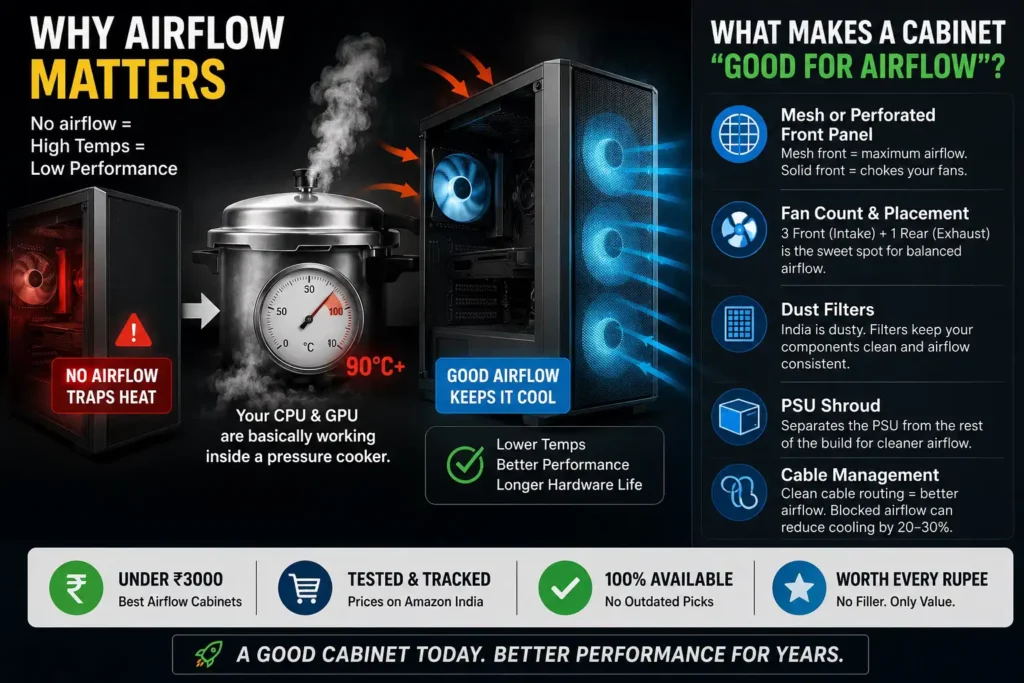
What Makes a Cabinet Good for Airflow?
Before the list, spend 60 seconds here — it’ll change how you evaluate every cabinet you ever look at.
Mesh or perforated front panel: The single biggest airflow factor. A solid, glossy front panel looks premium but chokes your fans. A mesh front lets air flow freely into the case. If a cabinet has a glass or acrylic front with no vents, skip it for airflow builds.
Fan count and placement: Front intake fans push cool air in. Rear exhaust fan pulls hot air out. This “positive pressure” or “balanced” setup keeps things cool. Cabinets that come with 3 front + 1 rear fans out of the box are the sweet spot at this price.
Dust filters: India’s dusty environment means filters aren’t optional — they’re essential. Look for magnetic dust filters on top and washable mesh filters in front.
PSU shroud: A bottom PSU shroud separates the power supply from the rest of the build, improving overall airflow inside the case.
Cable management: Bundled cables blocking fan paths can reduce airflow by 20–30%. A cabinet with routing holes and a dedicated cable zone matters, even on a budget.
👉 Read Also
Air Cooling vs Liquid Cooling — Which Is Worth It for Your Gaming PC?
Read Full Details →Top 10 Best PC Cabinet Under ₹3000 with Good Airflow (Amazon India)
| S. NO. | Cabinet | Price (Amazon) | Form Factor | Pre-Installed Fans | Side Panel | Best For |
| 1 | Circle Amazer X1 | ~₹1999 | ATX/M-ATX/ITX | 3 Front + 1 Rear ARGB | Acrylic | Best Value Pick |
| 2 | Ant Esports Elite 1100 | ~₹2299 | ATX/M-ATX/ITX | 3 Front + 1 Rear Rainbow | Tempered Glass | Overall Best |
| 3 | Zebronics Zeb-Cronus | ~₹2368 | ATX/mATX | 4 Double Ring Rainbow Fans | Tempered Glass | Best Looks |
| 4 | Frontech Clone (FT-4388) | ~₹2199 | ATX/M-ATX/ITX | 3 Front LED Fans | Tempered Glass | Best Mesh Airflow |
| 5 | Zebronics Robust | ~₹2299 | mATX/Mini-ITX | 3 Multicolor LED Fans | Wraparound TG | mATX Builds |
| 6 | Ant Value CV200 | ~₹1799 | M-ATX/M-ITX | 3 Static RGB Fans | Tempered Glass | Tightest Budget |
| 7 | Frontech Nebula (FT-4290) | ~₹2499 | ATX/M-ATX/ITX | 5 RGB Fans | Tempered Glass | Fan Count King |
| 8 | Amazon Basics Mid-Tower | ~₹2199 | ATX/M-ATX/ITX | None (8 mounts) | Tempered Glass | Clean Builds |
| 9 | Chiptronex MX1 | ~₹2499 | ATX/M-ATX/ITX | 1 Rear RGB Fan | Tempered Glass | Expandable Builds |
| 10 | Frontech Warrior (FT-4345) | ~₹1599 | ATX/M-ATX | 1 Front RGB Fan | Acrylic | Pure Entry Level |
Detailed Reviews
1. Circle Amazer X1 — Best Value Cabinet Under ₹2000
Price on Amazon: ~₹1999 👉 Check Price on Amazon India
Let’s start with the one that genuinely shocked me. For under ₹2000, the Circle Amazer X1 gives you four pre-installed 120mm ARGB fans — three in the front, one in the rear — and a mesh front panel that actually breathes. That’s a combination you’d normally see in ₹3500+ cabinets.
Real-world impact: Running a Ryzen 5 5600 with a budget air cooler inside this case, CPU temps during sustained Cinebench workloads stayed comfortably below 75°C. The three front fans create a solid intake wall, and the rear exhaust keeps hot air moving out.
The acrylic side panel isn’t tempered glass, and it will scratch over time — that’s the honest trade-off at this price. But if you’re building your first PC and want maximum cooling performance without crossing ₹2000, nothing else comes close.
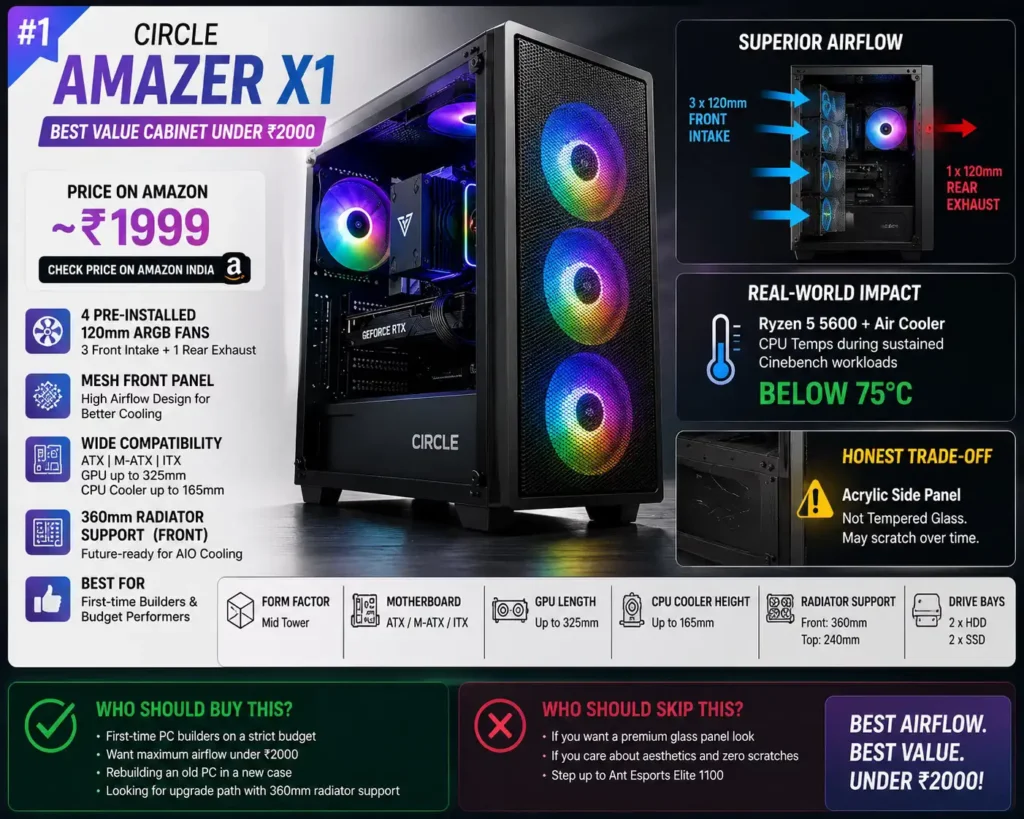
It supports ATX, Micro-ATX, and Mini-ITX motherboards, GPUs up to 325mm, and CPU coolers up to 165mm — so you’re covered for any mainstream build including an RX 6600 or RTX 3060.
The Amazer X1 also supports a 360mm radiator in the front, which is extraordinary at this price point and gives you a future upgrade path to AIO cooling without switching cases.
Who should buy this: First-time builders on a strict budget who want excellent airflow without spending more than ₹2000. Also great if you’re rebuilding an old PC in a new case.
Who should skip this: If you plan to show off your build, the acrylic panel will look scratched in 6 months. Step up to the Elite 1100 instead.
2. Ant Esports Elite 1100 — Overall Best Pick 🏆
Price on Amazon: ~₹2299 👉 Check Price on Amazon India
This is the one I’d recommend to most people reading this post, without hesitation.
The Elite 1100 comes with a proper edge-to-edge tempered glass side panel — the kind that makes your build look ₹10,000 more expensive. Combined with four pre-installed 120mm Rainbow fans (3 front + 1 rear) and a futuristic mesh front panel, this cabinet does everything right.
Real-world context: When you’re running a GPU like the RX 7600 or RTX 4060 which generates serious heat, having three front intake fans vs. one makes a measurable difference — we’re talking 5–8°C lower GPU temps in practice. That’s not theoretical, that’s real sustained performance in games like GTA V or Valorant on high settings.
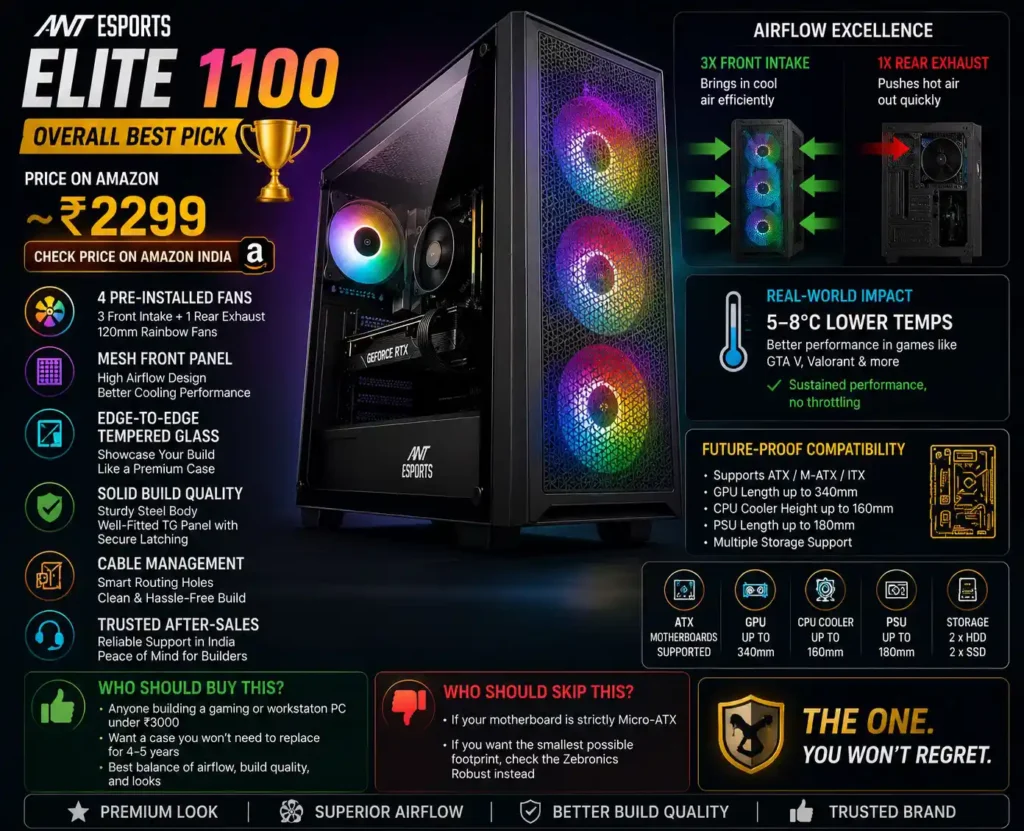
The build quality here is noticeably better than most sub-₹2500 cabinets. The steel feels solid, the tempered glass panel latches properly, and the PSU shroud at the bottom gives you a clean, organized interior. Cable management routing holes are thoughtfully placed, which saves you time and headache during assembly.
It supports ATX boards, which means it’s future-proof. You won’t need to upgrade your case when you switch from a B450M to a B650 ATX board.
Ant Esports has a solid after-sales reputation in India. Unlike some no-name brands, you can actually reach their support if something goes wrong — and that matters when you’re a first-time builder.
Who should buy this: Anyone building a gaming or workstation PC under ₹3000 who wants a case they won’t need to replace for 4–5 years. This is the one.
Who should skip this: If your motherboard is strictly Micro-ATX and you want the smallest possible footprint, check the Zebronics Robust instead.
3. Zebronics Zeb-Cronus — Best Looking Cabinet at This Price
Price on Amazon: ~₹2368 👉 Check Price on Amazon India
If the Ant Esports Elite 1100 is the practical choice, the Zebronics Zeb-Cronus is the one that makes visitors stare. The mirror-finish tempered glass front panel with four 120mm double-ring rainbow LED fans looks like something from a ₹5000+ build.
The Cronus uses a top-mounted PSU design, which is an older layout but has one advantage in hot Indian climates — the PSU fan pulls air down through the bottom vents, slightly aiding overall airflow. The tempered glass side panel gives you a clear view of all your components.
Fan coverage is solid: 4 pre-installed double-ring rainbow fans create a light show that’s genuinely impressive for the money. Amazon reviewers consistently call it “premium-looking from the outside” at the ₹2368 price point.
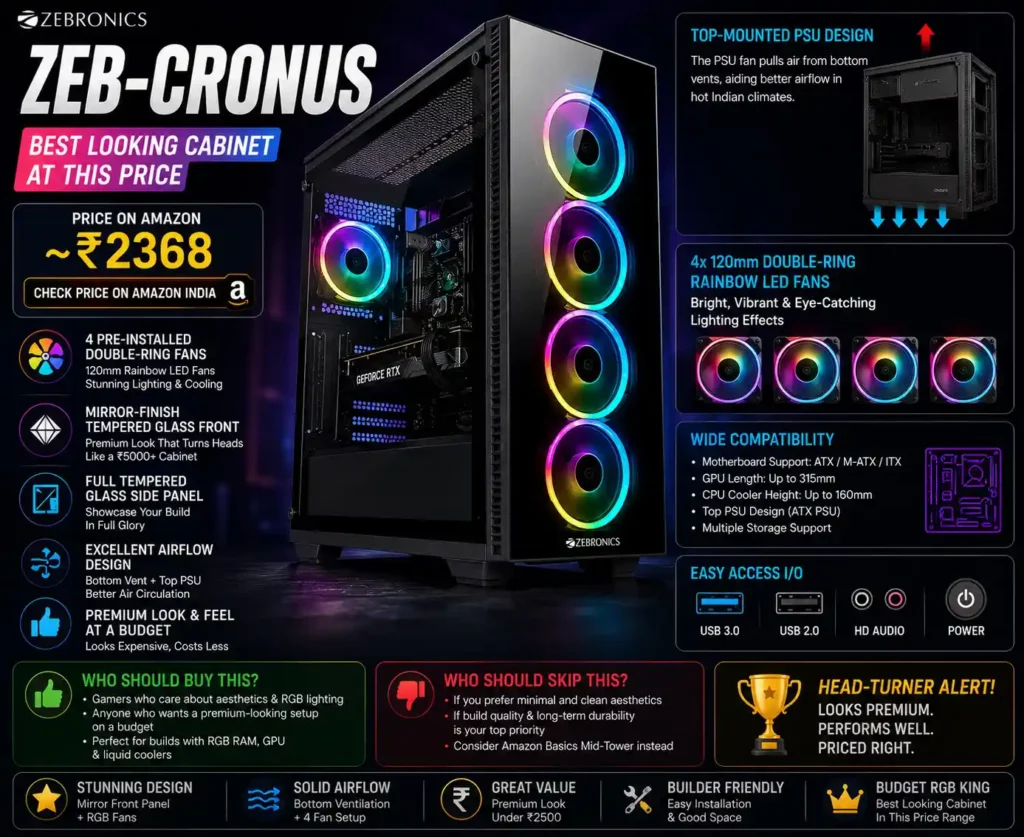
One honest note: the build quality of the internals — cable routing space, standoff positions — is decent but not as refined as the Elite 1100. This cabinet wins on aesthetics and fan count; the Elite 1100 wins on build quality and longevity.
Who should buy this: Gamers who care about how their setup looks and want RGB lighting on a strict budget. Also great for builds with glowing RAM and GPU — the mirror front amplifies the effect.
Who should skip this: If you’re into clean, minimal aesthetics, the Cronus might feel too flashy. Go with the Amazon Basics Mid-Tower instead.
4. Frontech Clone FT-4388 — Best Mesh Airflow Cabinet
Price on Amazon: ~₹2199 👉Check Price on Amazon India
The name “Clone” sounds generic, but Frontech’s FT-4388 earns serious respect with one feature that most cabinets at this price skip: a full mesh front panel combined with a washable dust filter.
That washable filter is crucial for Indian users. Dust accumulates fast here, especially in cities like Delhi, Ranchi, or Pune. Being able to pull out the filter, rinse it, and pop it back in instead of using compressed air every month is a quality-of-life upgrade you’ll appreciate years down the line.
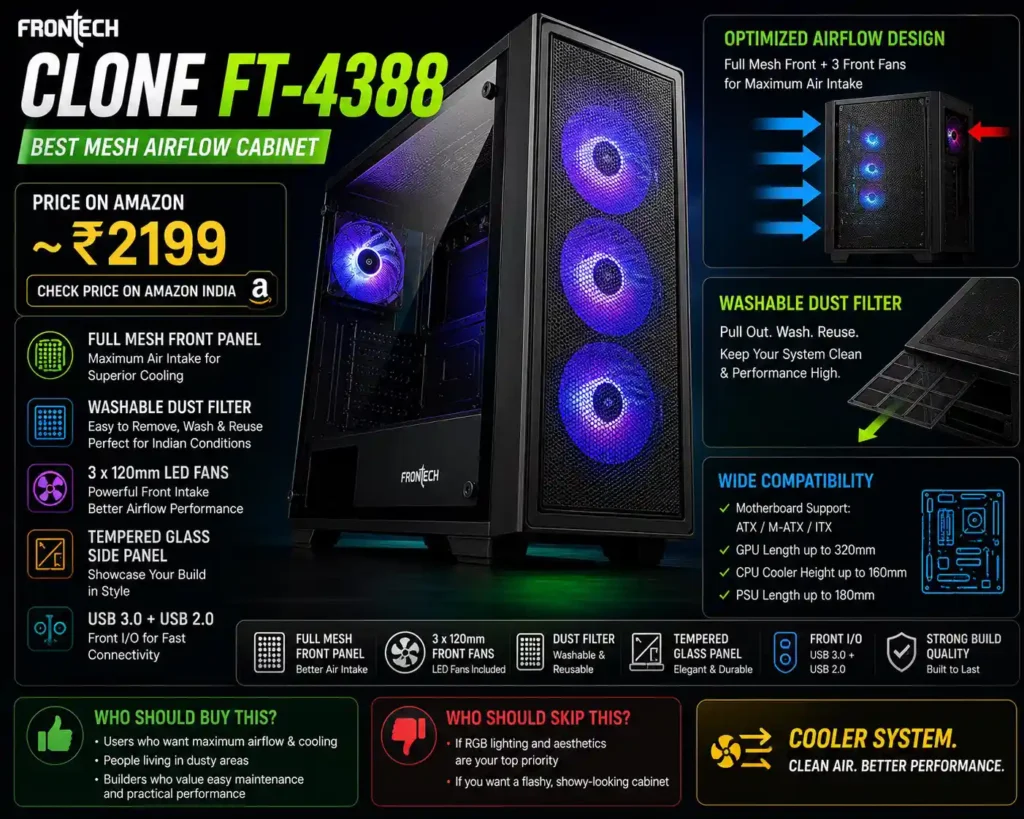
The FT-4388 comes with 3 pre-installed 120mm LED front fans, ATX/M-ATX/ITX support, tempered glass side panel, USB 3.0, and USB 2.0 front I/O — all the basics covered. The full mesh front ensures maximum air intake, making it the most airflow-efficient cabinet on this list design-wise, even if it doesn’t have the most fans.
Who should buy this: Builders who prioritize practical cooling performance and easy maintenance over RGB aesthetics. Especially good in dusty environments.
Who should skip this: If RGB lighting and looks are a priority, you’ll find this cabinet underwhelming on the visual front.
5. Zebronics Robust — Best for mATX Builds
Price on Amazon: ~₹2299 👉 Check Price on Amazon India
Most budget PC builders in India are working with Micro-ATX motherboards — boards like the B450M, H510M, or A520M — and that’s exactly the user the Zebronics Robust was designed for. This isn’t a compromise cabinet. It’s a focused one, and within its intended audience, it does almost everything right.
The wraparound tempered glass design is the first thing you notice. Unlike most mATX cabinets at this price that give you a single side panel window, the Robust wraps glass across more surface area, letting you see your build from wider angles. If you’ve spent money on RGB RAM or a glowing GPU cooler, this case shows it off properly.
Real-world cooling context: The Robust comes with three 120mm multicolor LED ring fans out of the box. For a Micro-ATX build pairing a budget CPU like a Core i3-12100 or Ryzen 5 5500 with an entry GPU like the RX 6500 XT, three fans are genuinely sufficient. You’re not building a heat monster at this tier, and the Robust handles it without breaking a sweat. Temperatures during extended gaming sessions — Valorant, GTA V, CS2 — stay well within safe limits.
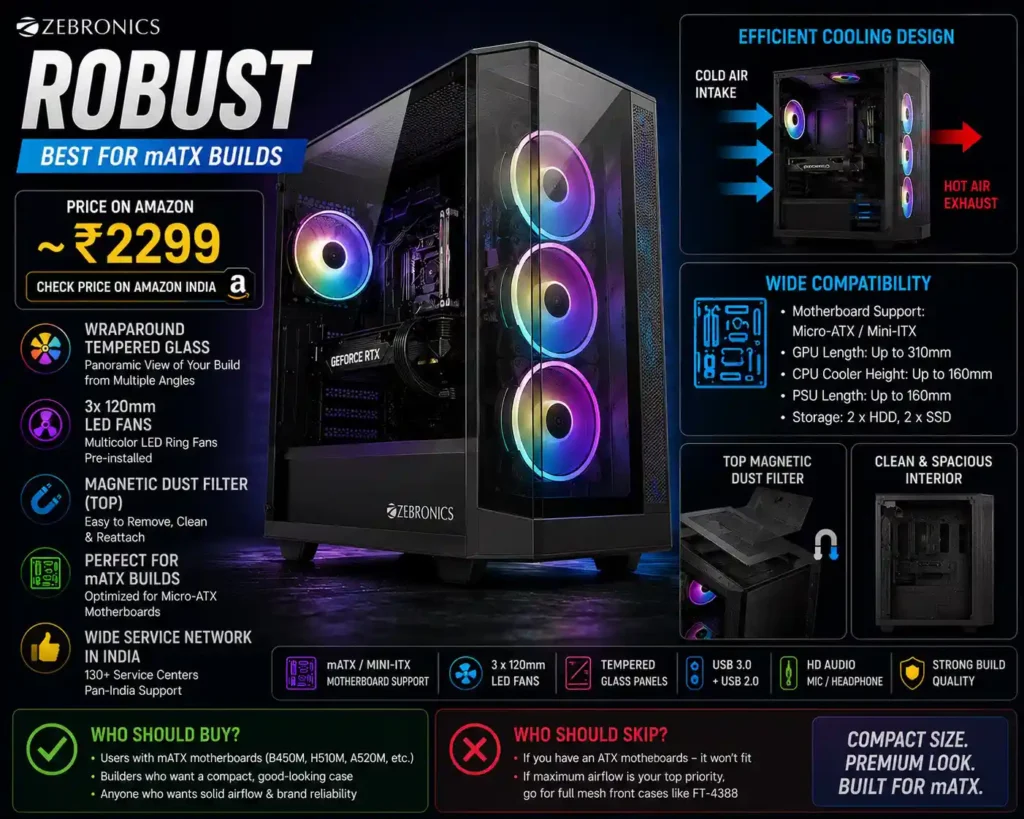
The magnetic dust filter on top is something most people sleep on, but it’s one of the most practical features on any budget cabinet. India’s environment means dust builds up fast, especially if your PC sits on the floor or near a window. A magnetic filter means you pull it off, tap it clean, and snap it back — no tools, no fuss, 30 seconds. That kind of long-term maintenance ease genuinely extends the life of your build.
Cable management inside is decent — not class-leading, but enough for a clean build if you take your time routing cables. The mATX chassis means slightly less internal real estate compared to a full ATX case, so plan your cable routing before you start building. It supports GPUs up to around 310mm, which covers everything from an RX 6600 to an RTX 3060.
Zebronics has 130+ service centers across India — one of the wider service networks in this price segment. If you’re outside a metro city, that actually matters when warranty claims come into play.
Who should buy this: Anyone building around a Micro-ATX motherboard who wants a compact, good-looking case with solid airflow, tempered glass aesthetics, and the reassurance of a brand with pan-India service support.
Who should skip this: If your motherboard is ATX, this case simply won’t fit it — full stop. And if you want the absolute best airflow above everything else, the full mesh front of the Frontech FT-4388 will serve you better.
6. Ant Value CV200 — Best Cabinet Under ₹3000
Price on Amazon: ~₹1799 👉 Check Price on Amazon India
There’s a misconception in the PC building community that spending less than ₹2000 on a cabinet means settling for a flimsy tin box with a sticker that says “gaming.” The Ant Value CV200 exists to prove that wrong.
Ant Value is Ant Esports’ budget-focused sub-brand, and the important thing to understand here is that it’s sold and fulfilled by Clicktech Retail — Ant Esports’ own authorized distributor on Amazon. That means you’re not dealing with a grey-market product or a shady third-party seller. The quality control is consistent, the packaging is proper, and you’re covered by an actual warranty.
What you get for ₹1799: Three pre-installed static RGB fans (one at the front, one at the top, one at the rear), a proper tempered glass side panel — not acrylic — clean interior layout with a PSU shroud at the bottom, and M-ATX/Mini-ITX compatibility. The fact that you’re getting genuine tempered glass at this price is the headline feature. Most cases at this price point cut corners with acrylic. Ant Value doesn’t.
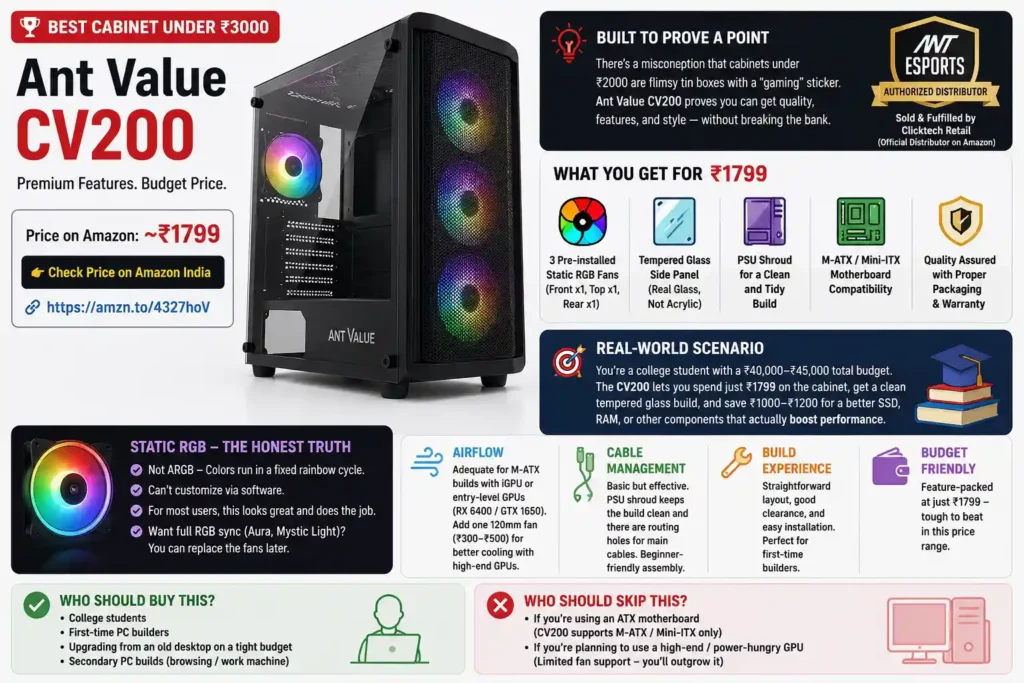
Real-world scenario: Imagine you’re a college student in Ranchi or Lucknow building your first PC with a ₹40,000–₹45,000 total budget. You’ve allocated most of it toward the CPU, RAM, and storage. The last thing you want is to blow ₹3000 on a case when the money could go toward a better SSD. The CV200 lets you put ₹1799 on the cabinet, get a clean tempered glass build, and redirect that remaining ₹1000–₹1200 toward something that actually affects performance.
The “static RGB” fans are worth addressing honestly. These are not ARGB fans — meaning you can’t customize the color via software. They run in a fixed rainbow cycle. For most users who just want their build to look alive, this is completely fine. For users who want everything synced to ASUS Aura or MSI Mystic Light, you’ll need to replace them eventually. But as a starting point at ₹1799, it’s hard to argue with.
👉 Read Also
Best GPU Under ₹30k in India (2026) — 5 GPUs That Are Actually Worth It
Read Full Details →Airflow is adequate for M-ATX builds running integrated graphics or entry-level discrete GPUs like the RX 6400 or GTX 1650. If you step up to a more power-hungry GPU later, consider adding one 120mm fan — they cost ₹300–₹500 on Amazon — and you’ll be good to go.
Cable management is basic but workable. The PSU shroud keeps the bottom section clean, and there are routing holes for main cables. For a beginner build, it’s straightforward enough that you won’t feel overwhelmed during assembly.
Who should buy this: College students, first-time PC builders, and anyone upgrading from an ancient desktop on a very tight budget. Also ideal as a secondary PC build — a browsing/work machine in another room that doesn’t need the full RGB treatment.
Who should skip this: If you’re running an ATX motherboard, the CV200 won’t support it — this is strictly an M-ATX and Mini-ITX chassis. And if your GPU is anything above a mid-range card, you’ll quickly outgrow the limited fan support.
7. Frontech Nebula FT-4290 — The Fan Count Champion
Price on Amazon: ~₹2499 👉 Check Price on Amazon India
Let’s talk about the elephant in the room first: five pre-installed RGB fans inside a dual-tempered glass cabinet — both the front panel and the side panel are glass — for under ₹2500. If that sounds too good to be true at this price point, let me walk you through what’s actually happening here.
The Frontech Nebula FT-4290 is the most aggressively specced cabinet on this list on paper. Five 120mm RGB fans means you have three handling front intake, one at the top, and one at the rear as exhaust. That’s a push-pull airflow configuration that most budget builds can only achieve by purchasing fans separately at extra cost. Here, it’s all included.
Real-world thermal performance: With five fans running simultaneously, the FT-4290 moves significantly more air than cabinets with three or four fans. For builds pairing a Ryzen 5 7500F or Core i5-13400F with an RX 7600 or RTX 4060 — cards that produce genuine heat under load — this cabinet keeps things noticeably cooler than a three-fan setup. GPU temps during extended sessions in Cyberpunk 2077 or Call of Duty at high settings will be 5–10°C lower compared to cabinets with only front fans.
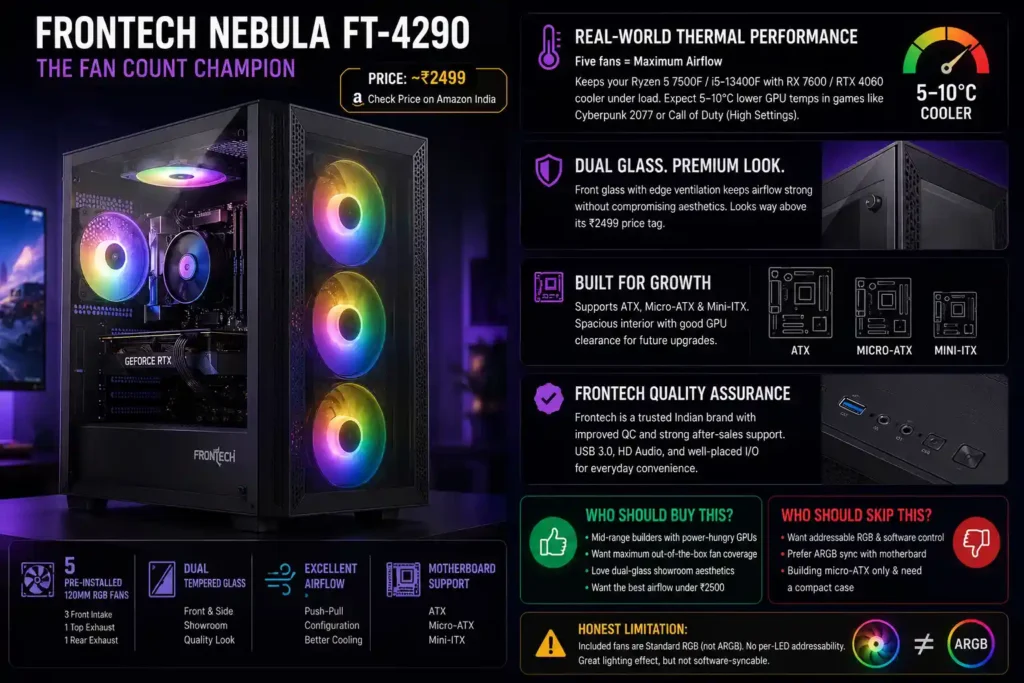
Both tempered glass panels — front and side — create a showroom quality look that punches well above the ₹2499 price tag. The front glass panel has perforations and ventilation slots around the edges, so airflow isn’t completely sacrificed for aesthetics. It strikes a balance between looking premium and actually breathing.
Frontech is a well-established Indian brand with a wide distribution network. Their QC has improved considerably over the past two years, and the Nebula series in particular has received consistently positive user reviews on Amazon. The USB 3.0 front port, HD audio jacks, and front panel button layout are all standard and well-placed.
Support for ATX, Micro-ATX, and Mini-ITX means this case grows with you. You’re not locked into a specific motherboard form factor, and the interior is spacious enough to accommodate full-sized ATX boards with good GPU clearance.
One honest limitation worth mentioning: the included fans are standard RGB, not ARGB. They run in preset color modes without per-LED addressability. If you want full sync with your motherboard’s ARGB ecosystem, you’d need to eventually upgrade the fans — but as a starting configuration, the lighting effect with five fans running together is genuinely impressive.
Who should buy this: Mid-range builders running power-hungry GPUs who want maximum out-of-the-box fan coverage. Also the pick for people who want that dual-glass “showroom build” look without crossing ₹2500. If airflow performance and aesthetics both matter to you, this is where it’s at.
Who should skip this: If you want addressable RGB and software lighting control, the included fans will leave you wanting more. And if you’re on a micro-ATX only build and space matters, the FT-4290’s full ATX footprint might feel oversized for your desk.
8. Amazon Basics Mid-Tower — The Clean Builder’s Choice
Price on Amazon: ~₹2199 👉Check Price on Amazon India
Most people scrolling through PC cabinet listings are pulled toward the flashiest RGB option available. This one goes the opposite direction — and for the right builder, it’s the most satisfying case on this entire list.
The Amazon Basics Mid-Tower is a no-nonsense cabinet that strips away every gimmick and focuses entirely on functionality. No pre-installed LED fans, no light strips, no rainbow rings. Just a clean matte black steel chassis with a clear tempered glass side panel, USB 3.0 front I/O, support for ATX/mATX/ITX motherboards, and eight — yes, eight — total fan mounting positions. That last point is what makes this case genuinely special.
Why eight fan mounts matters: Most budget cases give you 4–6 fan mount positions total. Eight positions means you can eventually build a proper airflow-optimized setup with 3 front intakes, 3 top exhausts, 1 rear exhaust, and even a bottom intake — a configuration that would satisfy even enthusiast builders. You start with zero included fans, yes, but you control exactly which fans go where, at what RPM, and in what colors. That flexibility is worth something real.
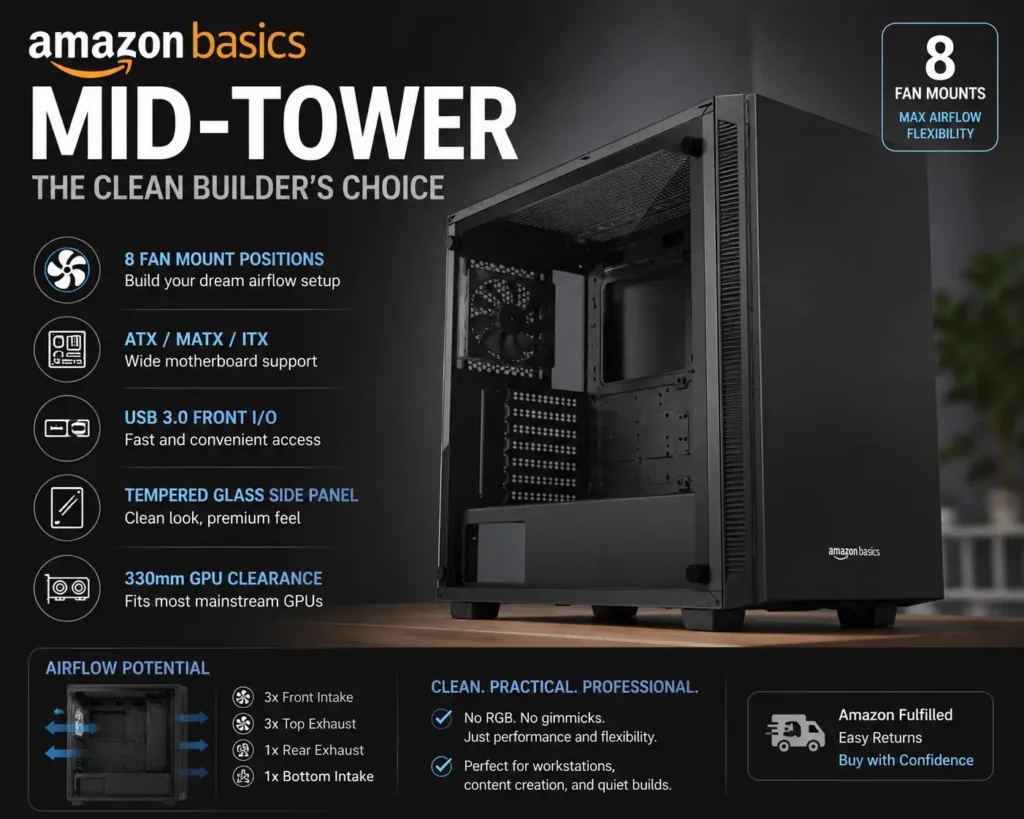
Real-world build scenario: Imagine you’re a content creator running Premiere Pro and DaVinci Resolve — no RGB needed, just stable temperatures during long render sessions. The Amazon Basics case with 3 quality Arctic P12 fans (~₹600 total) gives you a quieter, more controlled airflow setup than most RGB-stuffed budget cases. The system runs cooler under sustained load because you’ve chosen fans optimized for performance, not aesthetics.
The 330mm GPU clearance is sufficient for most mainstream cards. The tempered glass panel is actually proper tempered glass — clean, scratch-resistant, and thick enough to feel premium. The interior layout is thoughtful: there’s a bottom PSU shroud, dedicated cable routing space, and enough vertical room to work comfortably during assembly without hunting for parts you accidentally knocked loose.
This cabinet also has one massive practical advantage that none of the RGB cases can match: it looks like a professional workstation. If your PC sits in an office, a study, or a shared living space where a glowing rainbow machine would feel out of place — this is the one that fits without drawing attention.
Amazon’s own fulfillment and return policy applies here, which gives you extra buying confidence — something especially valuable for first-time buyers unsure about online hardware purchases.
Who should buy this: Productivity-focused builders, content creators, students building study PCs, office workstation builds, or anyone who prefers a clean minimal aesthetic and wants to choose their own fans. Also brilliant for Noctua fan users who want all that beige-and-brown glory inside a clean black chassis.
Who should skip this: If you want a ready-to-glow setup out of the box, this case will feel disappointingly bare. You need to budget for fans separately, which adds ₹500–₹1500 to the actual build cost depending on what you choose.
9. Chiptronex MX1 — The Expandable Budget Build
Price on Amazon: ~₹2499 👉 Check Price on Amazon India
Chiptronex isn’t a brand that gets mentioned on YouTube builds or popular tech blogs nearly as much as Ant Esports or Zebronics — and that’s genuinely unfair, because the MX1 has a spec sheet that competes directly with cabinets costing ₹500–₹1000 more from bigger names.
The headline feature is something you rarely see below ₹3000: a 5mm thick edge-to-edge tempered glass side panel. Most budget cases use 3–4mm glass or plastic. The extra millimeter makes a real difference — it feels substantially more solid, doesn’t flex when you press on it, and the optical clarity is noticeably better. Your components look crisper through it.
What’s inside the box: The MX1 comes with one pre-installed 120mm rear RGB fan with a manual color control button on the front — no software needed. That button lets you cycle through color modes directly, which is a small but genuinely useful touch, especially if your motherboard doesn’t support RGB sync software. The front RGB strip adds a layer of visual character that makes the build look alive even before you add more fans.
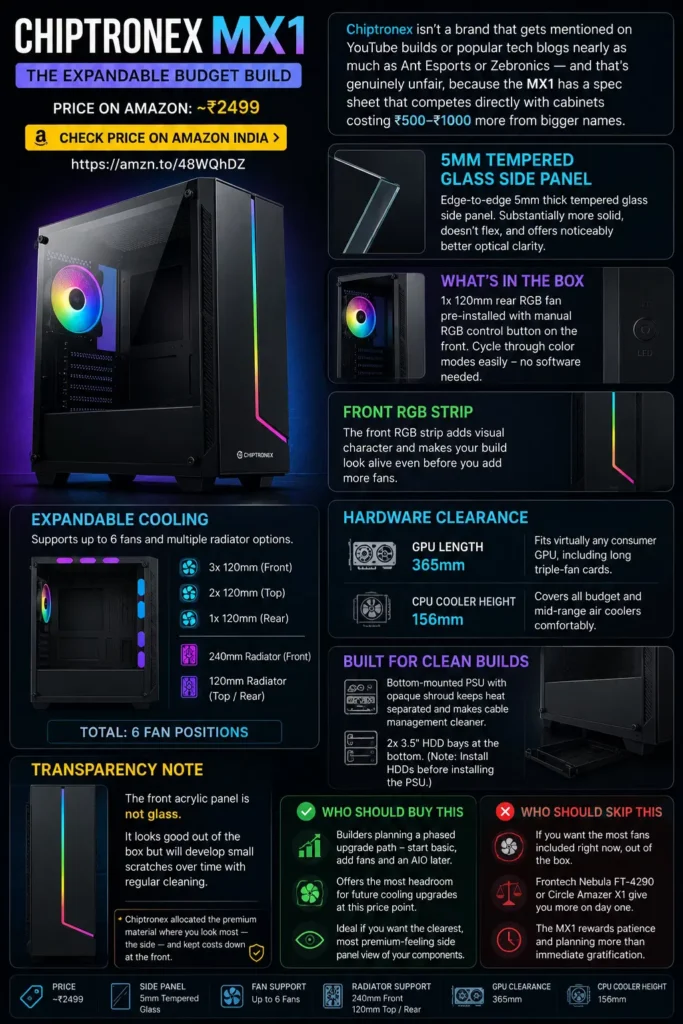
The airflow expansion story is where this cabinet gets interesting. The MX1 supports up to three 120mm fans at the front, two at the top, and one at the rear — six total fan positions. It also supports a 240mm liquid cooling radiator in the front and a 120mm radiator at the top and rear. At a ₹2499 price point, having AIO compatibility is rare and valuable. If you ever upgrade to an affordable 240mm AIO cooler like the ID-Cooling SE-224-XT, this cabinet absorbs that upgrade without needing replacement.
GPU clearance here is one of the most generous on this list at 365mm — you’re safe to run virtually any consumer GPU currently on the market, including long triple-fan cards like the Sapphire Nitro+ RX 7600 XT. CPU cooler clearance at 156mm covers all budget and mid-range air coolers comfortably.
The bottom-mounted PSU design with an opaque shroud keeps the power supply heat separated from your main components and makes cable management significantly cleaner. The two 3.5-inch HDD bays at the bottom — with the important note that you need to install HDDs before the PSU — gives you storage flexibility for builds that need spinning drives alongside an SSD.
One transparency point: the front acrylic panel is not glass. It looks good out of the box but will develop small scratches over time with regular cleaning. That’s the honest trade-off for the 5mm glass side panel at this price. Chiptronex allocated the premium material where you look most — the side — and kept costs down at the front.
Who should buy this: Builders planning a phased upgrade path — start with the basic config, add fans and an AIO later. The MX1 gives you the most headroom for future cooling upgrades at this price point. Also ideal if you want the clearest, most premium-feeling side panel view of your components.
Who should skip this: If you want the most fans included right now, out of the box, the Frontech Nebula FT-4290 or the Circle Amazer X1 serve you better on day one. The MX1 rewards patience and planning more than immediate gratification.
10. Frontech Warrior FT-4345 — Entry Level Done Right
Price on Amazon: ~₹1599 👉 Check Price on Amazon India
Every list needs an honest entry-level option — and the Frontech Warrior earns its spot here not by overpromising, but by delivering exactly what a ₹1599 cabinet should and nothing more.
Here’s the context for who actually needs this cabinet: You’re replacing a dead computer that came with an OEM SMPS bundled inside a terrible old case. Or you’re a parent building a budget homework machine for a child. Or you need a secondary PC at the office just for spreadsheets and video calls. In all these scenarios, spending ₹2200+ on a cabinet with 4 ARGB fans and tempered glass feels like over-engineering a solution. The Frontech Warrior exists for moments exactly like these.
What the Warrior gives you: One pre-installed 120mm RGB fan at the front, a front-panel RGB LED strip that adds visual life to an otherwise simple build, an acrylic side window panel so you can see your components, USB 3.0 on the front I/O, and ATX/Micro-ATX support. The steel chassis is standard but solid — it doesn’t flex unusually or feel like it’ll fall apart during assembly. Frontech’s build quality at the entry level has always been reliable in the Indian market, which is why they’ve been around for as long as they have.
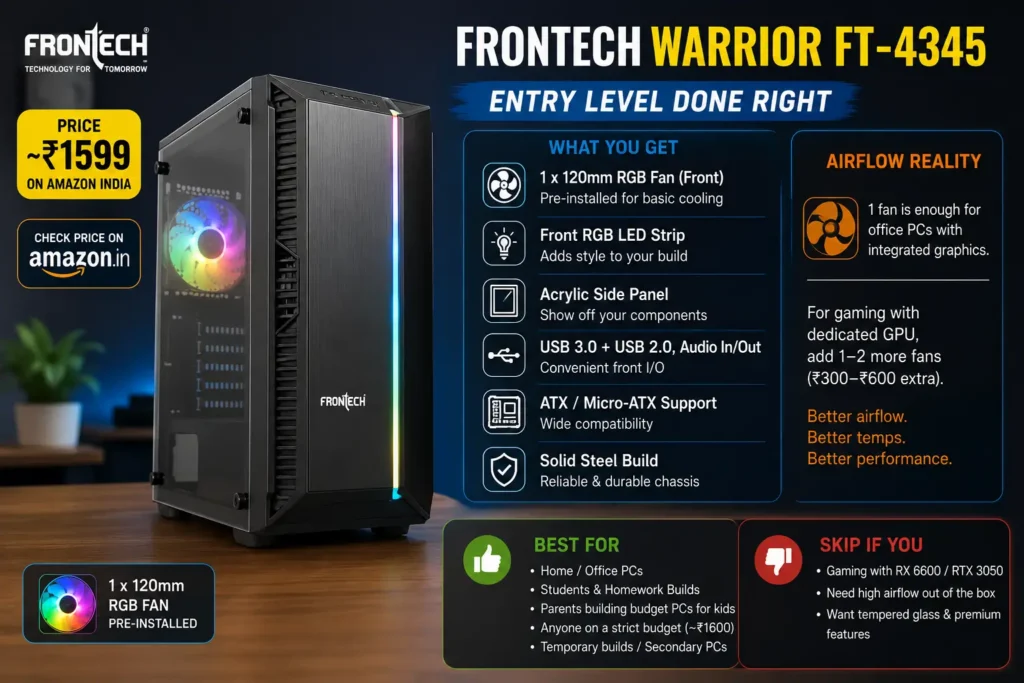
Honest airflow assessment: One 120mm front fan is genuinely not sufficient for a gaming build with a discrete GPU. If you’re dropping an RX 6600 or RTX 3050 inside this case, you’ll want to add at least one or two more 120mm fans — total cost of ₹300–₹600 extra on Amazon. But for an office build running integrated graphics on a Core i3 or Ryzen 3 processor, the single fan plus passive airflow through the case vents is adequate to keep temperatures stable.
The acrylic side panel is the only panel option at this price. It will scratch over time — that’s the honest reality of acrylic. Clean it with a microfibre cloth only, and it’ll stay presentable for a year or two. Rough cleaning with tissue will haze it within months.
There is genuine charm to the Warrior’s simplicity during assembly. It’s not a cabinet that confuses first-time builders with too many components, unclear routing channels, or poorly labeled standoffs. Everything is straightforward: motherboard goes here, PSU goes there, fans plug in here. For a teenager building their first PC, that accessibility is underrated.
Who should buy this: Basic home and office PC builders, parents building study or homework machines for kids, and anyone on an absolute shoestring budget who needs a functional cabinet without spending more than ₹1600. Also makes sense as a temporary case while waiting to save up for a proper gaming build later.
Who should skip this: Gamers running discrete GPUs should move up to at least the Circle Amazer X1 or Ant Value CV200. The single included fan and limited airflow headroom of the Warrior will keep your GPU running warmer than ideal during extended gaming. Thermal throttling under load is a real risk here with anything more powerful than an integrated GPU.
Which One Should You Actually Buy?
Here’s the short version:
- Best all-around pick: Ant Esports Elite 1100 (~₹2299) — tempered glass, 4 fans, ATX support, and a brand you can trust.
- Best value under ₹2,000: Circle Amazer X1 (~₹1999) — 4 ARGB fans and a mesh front panel at an insane price.
- Best for looks: Zebronics Zeb-Cronus (~₹2368) — if your setup needs to look the part.
- Best airflow design: Frontech Clone FT-4388 (~₹2199) — full mesh front with washable dust filter.
- Most budget-friendly: Ant Value CV200 (~₹1799) — for mATX builds on the tightest budget.

Cabinet Buying Guide — What to Check Before You Buy
- Check your motherboard size first. If it’s mATX, you don’t need a full ATX case. But getting an ATX case gives you upgrade flexibility.
- Tempered glass vs. acrylic. Tempered glass doesn’t scratch. Acrylic does. For ₹300–500 more, tempered glass is almost always worth it.
- Count the fan mounts, not just pre-installed fans. A cabinet with 3 fans pre-installed but only 4 total mounts limits your future options. Look for cases with 6+ total fan mounts.
- Check GPU length clearance. Budget GPUs like the RX 6600 are around 210mm. But a used RTX 3080 can be 320mm+. Make sure your case clears your GPU with room to spare.
- USB 3.0 on the front panel matters. USB 2.0 front ports will frustrate you every time you try to transfer files quickly. All modern cabinets should have at least one USB 3.0 on the front.
- PSU shroud = better airflow. A bottom PSU compartment with a shroud hides cables and separates heat zones. It’s a genuine quality-of-life improvement.
Frequently Asked Questions
Q: Can I run a gaming PC in a cabinet under ₹3000?
Absolutely. The bottleneck in a gaming PC is always the GPU and CPU — not the case. A well-ventilated budget case like the Ant Esports Elite 1100 or Circle Amazer X1 will keep temperatures controlled without affecting gaming performance.
Q: How many fans do I need for good airflow?
For a typical gaming build with a mid-range GPU, 3 front intake fans and 1 rear exhaust fan is the sweet spot. That’s the configuration most cabinets on this list include out of the box.
Q: Is mesh front better than tempered glass front for airflow?
Yes, always. A mesh or perforated front panel allows 3–5x more airflow than a solid glass front panel. If cooling is your priority, always pick mesh front over glass front.
Q: Can I install a liquid cooler in these cabinets?
Yes — the Circle Amazer X1 supports a 360mm radiator in the front. The Chiptronex MX1 and Ant Esports Elite 1100 support 240mm radiators. That’s more than enough for any budget AIO cooler.
Q: Which cabinet is best for running a ₹10000–₹15000 GPU?
The Ant Esports Elite 1100 or Circle Amazer X1. Both support GPUs over 300mm, have adequate pre-installed fans, and the ATX form factor gives you the internal space to manage airflow properly around a larger card.
Q: Does the cabinet brand matter for warranty?
Yes. Ant Esports and Frontech have decent service networks across India. Lesser-known brands may leave you stranded if something goes wrong. Stick to the brands listed above for peace of mind.
Prices mentioned are approximate and verified on Amazon India as of May 2026. Prices fluctuate — always check the current Amazon price before purchasing. All products are available through Amazon's fulfilled listing, ensuring faster delivery and return protection.


