Best Gaming Mouse Under ₹1500 in India

Let’s be real — when you’re building a PC on a budget, the mouse is usually the last thing you want to overspend on. The GPU, CPU, SSD, and RAM are already fighting for every rupee. A ₹5,000 mouse doesn’t make sense when you’re running a build under ₹40,000. If you want a full gaming PC Setup you may read our post ₹50,000 Budget PC Build Guide.
But here’s the good news: the under-₹1,500 gaming mouse segment in India has genuinely gotten impressive. In 2026, you can get tri-mode wireless connectivity, a PixArt sensor that brands like Logitech and Razer use in pricier products, or a proven ergonomic shape from one of the world’s biggest gaming brands — all at this price.
I looked at three mice that are currently available under ₹1,500 on Amazon India: the Cosmic Byte Helios Tri-Mode, the Kreo Hawk, and the Razer DeathAdder Essential . Each makes a completely different argument for why you should pick it. The right answer depends on what you actually care about.
Let’s go through each one properly.
Quick Comparison at a Glance
| Cosmic Byte Helios | Kreo Hawk | Razer DeathAdder Essential | |
| Connectivity | Wired + 2.4GHz + Bluetooth | Wired only | Wired only |
| Sensor | FR2012 + S203 | PixArt PMW3327 | Razer 5G Optical |
| Max DPI | 10,000 | 12,400 | 6,400 |
| Polling Rate | 1000Hz (wired/2.4G) | — | 1000Hz |
| Buttons | 5 programmable | 8 programmable | 5 Hyper-response |
| Weight | 81g (without cable) | Lightweight | ~96g |
| Lighting | RGB (6 effects) | RGB (programmable) | Single-color green |
| Approx. Price | ~₹999–₹1,099 | ~₹1,299–₹1,449 | ~₹1,299–₹1,399 |
Prices on Amazon India fluctuate. Always check the current price on the product page before buying.
#1 — Cosmic Byte Helios Tri-Mode (Dragon Black)
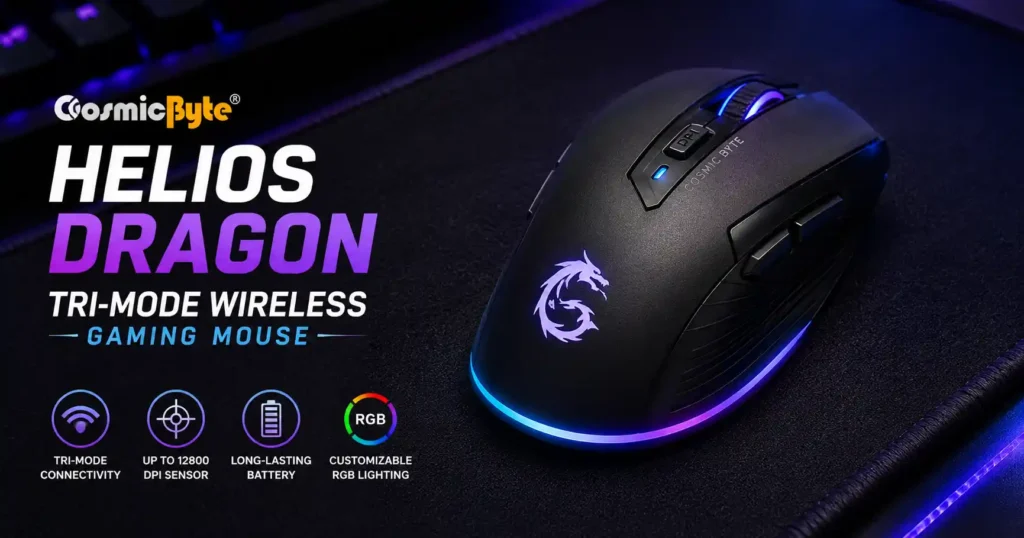
Approx. Price on Amazon India: ~₹999–₹1,099
If one mouse on this list genuinely surprises you, it’s this one. Tri-mode connectivity — wired, 2.4GHz wireless, and Bluetooth — for under ₹1,100 on Amazon India. That combination is hard to find even at ₹2,000–₹2,500 from mainstream brands.
Key Specifications
- Sensor: FR2012 + S203 dual-sensor setup
- DPI Range: 800 to 10,000 DPI (adjustable)
- Polling Rate: Up to 1000Hz in wired and 2.4GHz modes
- Connectivity: Wired + 2.4GHz Wireless + Bluetooth
- Switches: Huano rated for 10 million clicks
- Programmable Buttons: 5, with dedicated Windows software
- Mouse Feet: PTFE
- Weight: 81g without cable
- RGB: 6 lighting effects, fully software-customizable
What’s Actually Good
The 1000Hz polling rate in wireless mode is the real headline. Most wireless mice at this price cap polling at 125Hz or 250Hz in wireless mode because higher polling drains battery faster and costs more to implement. Cosmic Byte kept it at 1000Hz for both wired and 2.4GHz mode, which means cursor updates happen 1,000 times per second — the same responsiveness you’d expect from a dedicated wired mouse.
The Huano switches deserve a mention too. You’ll find Huano switches in gaming mice costing two to three times more. They’re crisp, tactile, and have a satisfying click feel without being overly stiff. At 10 million click lifespan, they’ll outlast most gaming sessions you can throw at them.
PTFE mouse feet on a sub-₹1,100 mouse is another detail that matters more than most people realize. PTFE glides smoother, wears slower, and feels noticeably different from the generic plastic feet on most budget mice. Your cloth mousepad will thank you.
At 81g without the cable, the Helios is legitimately lightweight for gaming. Many popular mice in the ₹2,000–₹3,500 range weigh between 90–105g.
What You Should Know
The FR2012 + S203 sensor is a Cosmic Byte-specific combination — it’s not a well-known third-party sensor with independent review data. The specs Cosmic Byte claims (60 IPS tracking speed, 20G acceleration) are acceptable numbers for casual-to-mid gaming, but this isn’t a sensor that pro-level FPS players will find in benchmark databases.
Also, Bluetooth mode is better suited for casual multi-device use — switching between your laptop and PC, for instance. For competitive gaming, always use 2.4GHz or wired mode.
Who Should Buy This?
Anyone who wants wireless freedom under ₹1,500, uses their mouse across multiple devices, or simply hates cable drag during long gaming sessions. If your budget is closer to ₹1,000, this is the only wireless gaming option in this price range that makes real sense.
#2 — Kreo Hawk (Black)
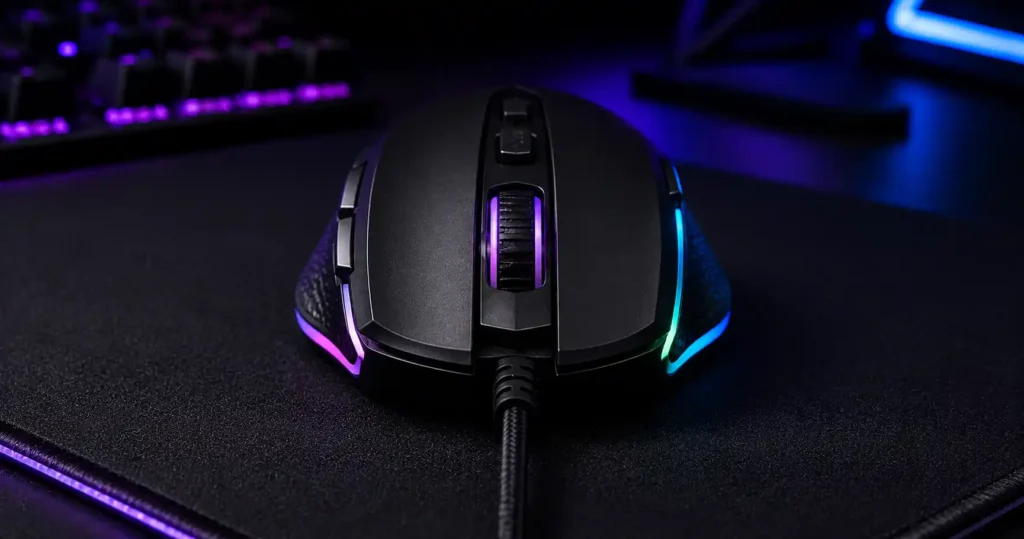
Approx. Price on Amazon India: ~₹1,299–₹1,449
Kreo is an Indian gaming peripheral brand that’s been quietly earning genuine respect in the budget PC community. The Hawk is their flagship wired gaming mouse, and the reason it keeps appearing in recommendation lists comes down to two words: PixArt PMW3327.
Key Specifications
- Sensor: PixArt PMW3327
- DPI Range: 200 to 12,400 DPI (7 adjustable levels)
- Programmable Buttons: 8
- Cable: 1.5m braided USB cable
- RGB: Programmable multi-color lighting
- Software: Kreo Hawk app (Windows)
- Design: Right-handed ergonomic
- Switch type: Optical
What’s Actually Good
The PMW3327 sensor is the biggest reason to consider this mouse. PixArt is the industry standard for gaming mouse sensors — this is the same family of sensors used in mice from Logitech, Razer, SteelSeries, and Zowie at various price points. Independent tracking data on this sensor is widely available, and it performs consistently without jitter, spin-out, or angle-snapping at typical gaming DPI ranges.
Finding a mouse with a verified PixArt sensor under ₹1,500 in India is genuinely uncommon. Most budget mice at this price use proprietary sensors with no external performance data — you’re taking the brand’s word for it. With the Hawk, you’re not.
Eight programmable buttons give you more macro and shortcut options than either competitor here. MMO players, MOBA players, or anyone who relies on side-button binds for in-game commands will appreciate this. Even for FPS play, having two side buttons for peek-binds or grenade keys is useful.
The 1.5m braided cable hits the sweet spot — long enough to not restrict movement, short enough to not pile up on the desk.
What You Should Know
This is a wired-only mouse. No wireless option at any connectivity mode. If cable-free use matters to you, the Hawk isn’t the answer.
Kreo doesn’t prominently publish polling rate specs for the Hawk in their official listings — this is worth verifying on the Amazon product page before purchase if 1000Hz polling is a hard requirement.
As a newer Indian brand, Kreo’s after-sales service network isn’t as widely tested or established as Razer or even Cosmic Byte. User reviews on Amazon India for the Hawk are solid overall, but keep that context in mind for long-term support expectations.
Who Should Buy This?
Competitive wired gamers who want the most technically credible sensor tracking in this price range. If you play Valorant, CS2, or any precision FPS and want to know your sensor isn’t the weakest link in your setup — this is the right call. The PMW3327 at under ₹1,500 is legitimately exceptional value.
#3 — Razer DeathAdder Essential (Black)
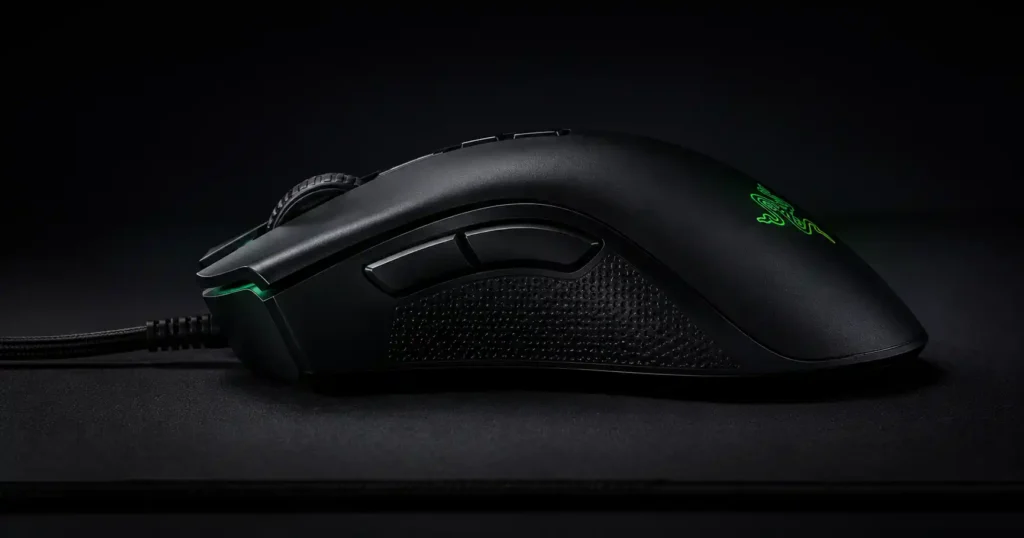
Approx. Price on Amazon India: ~₹1,299–₹1,399
The DeathAdder Essential doesn’t need to prove itself. The DeathAdder series is one of the most sold gaming mouse lines in history — comfortable, proven, and refined over years of feedback from millions of gamers worldwide. The Essential is Razer’s entry-level version of that legacy, and at under ₹1,400, it’s the most affordable way to own a Razer gaming mouse in India right now.
This specific listing (RZ01-02540100-R3M1) is the original DeathAdder Essential that Razer continues to sell in India at a heavily discounted price.
Key Specifications
- Sensor: Razer 5G Optical Sensor
- DPI: Up to 6,400 DPI
- Polling Rate: 1000Hz
- Buttons: 5 Hyper-response programmable buttons
- Switches: Razer mechanical, rated for 10 million clicks
- Cable: 1.8m
- Lighting: Single-color Razer green logo backlight
- Design: Right-handed ergonomic, rubber side grips
What’s Actually Good
Build quality. That’s the honest, simple answer. Pick up a DeathAdder Essential and compare it to any budget mouse — the shell rigidity, button feedback, and scroll wheel resistance are in a different class. Razer’s quality control on this mouse is consistent because it’s been in production long enough to have every tolerance dialed in.
The Hyper-response buttons have a precise, low-force actuation that’s noticeably sharper than the mushy left-clicks you get on generic budget mice. Combined with Razer’s mechanical switches rated for 10 million clicks, this is a mouse built to survive years of daily use.
The ergonomic shape is genuinely one of the most comfortable right-handed designs ever made in gaming mice. The thumb naturally rests on the rubber grip, the curve supports the palm without strain, and the button placement makes the two side buttons easy to reach without awkward finger repositioning.
6,400 DPI sounds low on paper compared to the other two mice here, but in practice, most competitive gamers play at 400–1600 DPI. The ceiling of 6,400 DPI is a non-issue for gaming. What matters is the accuracy of the tracking at the DPI settings you actually use — and the 5G optical sensor is reliable at standard ranges.
This mouse also has the strongest warranty and after-sales support of the three. Razer has official service and support channels in India.
What You Should Know
This is an older model. No wireless, no RGB (just the green logo), 5 buttons, and a 6,400 DPI ceiling. On a spec sheet comparison, it loses to the other two mice. That’s the honest reality.
The 1.8m cable is non-braided on this model, which makes it slightly stiffer than a braided cable, though it’s manageable.
If your heart is set on a current-generation Razer Essential with a newer sensor, look for the RZ01-03850100-R3M1 model instead — though that tends to be priced higher.
Who Should Buy This?
First-time PC gamers upgrading from an office mouse or a no-name gaming mouse. Anyone for whom brand reliability, build quality, and long-term durability matter more than spec numbers. If you’re setting up a PC and want one thing you won’t have to think about again for a couple of years — the DeathAdder Essential is that thing.
Which Mouse Should You Actually Buy?
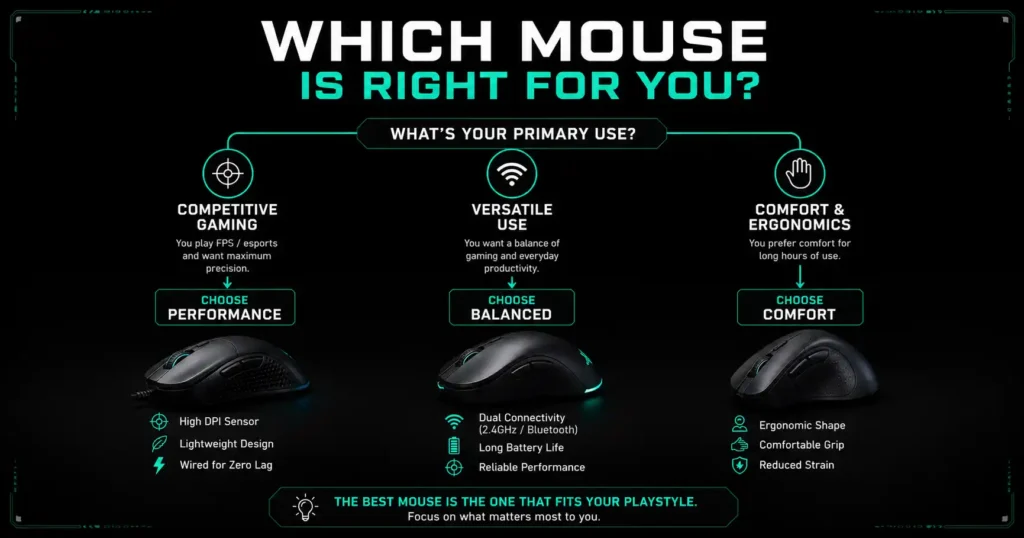
Choose the Cosmic Byte Helios if you want wireless connectivity, hate cable drag, use your mouse on multiple devices, or your budget is tighter (under ₹1,100). Nothing else in this price range gives you tri-mode wireless with 1000Hz polling.
Choose the Kreo Hawk if you’re a wired-only competitive gamer and sensor quality is the top priority. The PixArt PMW3327 at this price is a genuinely compelling offer for FPS players who want verified tracking performance.
Choose the Razer DeathAdder Essential if you want the most reliable, well-built mouse in this list backed by an established brand. Ideal for new PC builders, first-time gaming mouse buyers, or anyone who values consistency over spec numbers.
None of these is a bad choice. They’re just solving different problems.
Things to Know Before You Buy
DPI ≠ accuracy. A mouse with 12,000 DPI is not automatically better than one with 6,400 DPI. DPI is just a sensitivity multiplier. Most competitive players game at 400–1600 DPI regardless of what the mouse’s maximum is. Focus on sensor quality, not the maximum DPI number.
1000Hz polling rate matters. This means the mouse reports its position to your PC 1,000 times per second. A mouse polling at 125Hz (common in cheap mice) only updates 125 times per second — you’ll notice the cursor feeling sluggish during fast movements. All three mice here support 1000Hz in wired mode.
Get a cloth mousepad. A ₹200–₹400 gaming mousepad changes how any mouse feels and performs. Tracking consistency improves significantly on a proper cloth surface versus a bare plastic desk or irregular surface. This is the single best upgrade you can make alongside a new mouse. These are the 10 common mistakes that are making your pc slow
Wireless at this budget has trade-offs. The Cosmic Byte Helios is genuinely impressive for its price, but budget wireless mice will always have some trade-off in battery life, receiver reliability, or long-term connectivity quality compared to a ₹3,000+ wireless mouse. For casual to mid-level gaming, it works well. For ranked competitive play, wired is still safer.
Final Verdict
The Cosmic Byte Helios is the standout value pick of 2026 if wireless is your goal — nothing else at this price even competes on that front. The Kreo Hawk earns its spot for competitive players who want sensor credibility on a budget. And the Razer DeathAdder Essential continues to be the most comfortable, most reliable option for buyers who prioritize trust over spec sheets.
Pick the one that solves your actual problem, buy a decent cloth mousepad alongside it, and get back to gaming.
FAQ
Is a gaming mouse worth buying under ₹1,500 in India?
Yes. At this price in 2026, you can get 1000Hz polling rates, ergonomic designs, programmable buttons, and in the case of the Cosmic Byte Helios, even tri-mode wireless connectivity. These features genuinely improve gaming precision and comfort over standard office mice.
Does the Razer DeathAdder Essential work on Windows 11?
Yes. It works plug-and-play on both Windows 10 and Windows 11. Razer Synapse software is optional for customization but not required for basic use.
Is the Cosmic Byte Helios good for competitive gaming in wireless mode?
In 2.4GHz mode with 1000Hz polling, it performs well for casual-to-mid level competitive play. For ranked, high-level competitive play, wired mode gives you the most reliable connection.
What DPI setting should I use for FPS games like Valorant or CS2?
Most FPS players use 400–800 DPI with adjusted in-game sensitivity. High DPI can cause shakiness and reduce precision at fine aiming. Start at 800 DPI and adjust from there.
Is Kreo a reliable brand for gaming mice in India?
Kreo has built a solid reputation in the Indian budget gaming peripheral market. The Hawk’s use of a PixArt PMW3327 sensor is a strong indicator of product quality. User reviews on Amazon India are consistently positive for this model.

