5 Best Processors to Buy in 2026: Ryzen vs Intel Core Ultra Compared – If you’re building a PC in 2026 with a CPU budget between Rs17,000 and Rs38,000, you’re choosing between two very different philosophies right now. AMD’s Ryzen 9000 and 7000-series chips stick to fewer, faster cores and a 65W power budget. Intel’s Arrow Lake Refresh — the 250K Plus and 250KF Plus — throws 18 cores at the problem instead. Both approaches work. Which one is right for you depends on whether you’re gaming, editing, or both.
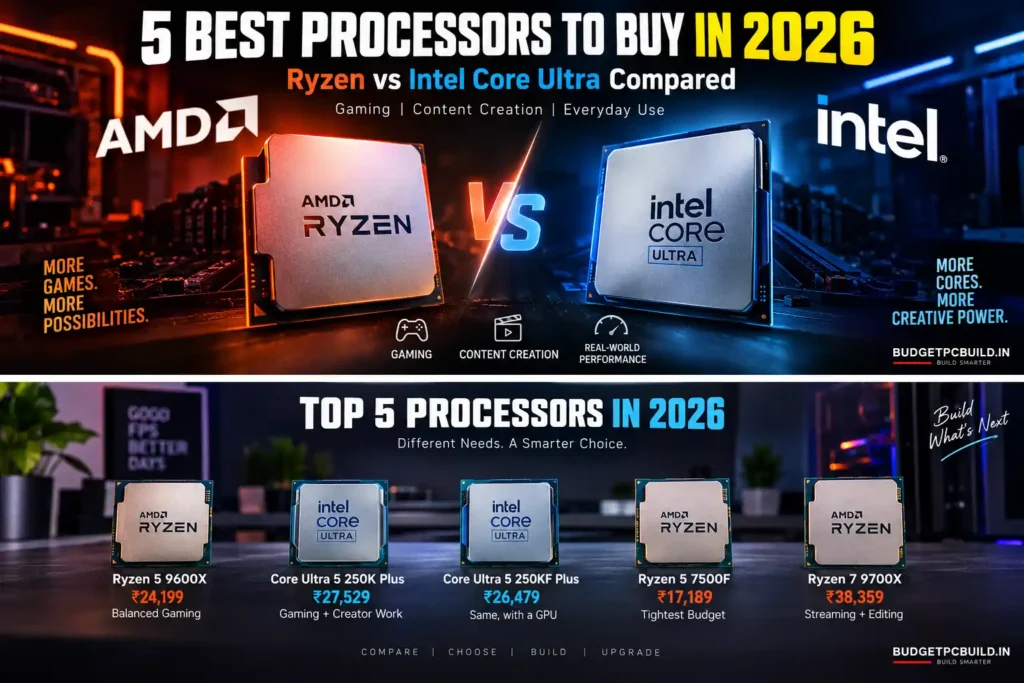
I’ve gone through five CPUs that Indian builders are actually buying right now, checked their real Amazon India pricing, and pulled in benchmark data from independent reviews (not marketing slides) to tell you honestly which one deserves your money — and which one you should walk past even if it’s tempting.
5 Best Processors to Buy in 2026 — Quick Comparison
| Processor | Cores/Threads | Max Boost | Cache | TDP | iGPU | Price | Best For |
|---|---|---|---|---|---|---|---|
| Ryzen 5 9600X | 6/12 | 5.4 GHz | 38MB total | 65W | Yes | ₹24,199 | Balanced gaming |
| Core Ultra 5 250K Plus | 18/18 | 5.3 GHz | 60MB total | 125W/159W | Yes | ₹27,529 | Gaming + creator work |
| Core Ultra 5 250KF Plus | 18/18 | 5.3 GHz | 60MB total | 125W/159W | No | ₹26,479 | Same, with a GPU already |
| Ryzen 5 7500F | 6/12 | 5.0 GHz | 38MB total | 65W | No | ₹17,189 | Tightest budget |
| Ryzen 7 9700X | 8/16 | 5.5 GHz | 40MB total | 65W | Yes | ₹38,359 | Streaming + editing |
Detailed Reviews
1. AMD Ryzen 5 9600X — Best Balanced Pick
BEST OVERALL VALUE Buy on Amazon
If you’re building a 1080p or 1440p gaming PC and don’t need to think too hard about it, this is the chip that gets out of your way. It’s built on AMD’s Zen 5 architecture, and the real-world IPC gains over Zen 4 show up in day-to-day responsiveness, not just synthetic benchmarks. What actually makes it easy to recommend is the 65W TDP — you’re not fighting heat in a mid-tower cabinet during a Delhi or Chennai summer. AMD Ryzen 5 9600X official specifications
- Zen 5 architecture with real per-core performance gains over the previous generation
- 65W TDP means a ₹1,500–2,000 tower cooler is genuinely enough
- AM5 socket — AMD confirmed at Computex 2026 that AM5 will keep getting new CPUs through 2029, so this motherboard has years of upgrade life left
- Integrated Radeon graphics work as a backup display output if your GPU needs an RMA
- PCIe 5.0 support for future SSDs and GPUs
- No cooler in the box — budget separately for one
- Only 6 cores; if you stream while gaming or run heavy background tasks, it’ll show
- Loses clearly to the 250K Plus and 9700X in multi-threaded workloads like video export or compiling
Who should buy it: Gamers who mainly play, not multitask — 1080p/1440p builds where FPS matters more than render times. Who should skip it: If you regularly edit video or run CPU-heavy creative apps alongside games, look at the 250K Plus below instead.
2. Intel Core Ultra 5 250K Plus — Best for Gaming + Creator Work
BEST FOR MULTITASKING Buy on Amazon
This one launched in March 2026 as Intel’s second attempt at Arrow Lake, and it’s the rare case of a refresh actually fixing what was wrong the first time. You get 18 cores (6 Performance + 12 Efficiency) for roughly the price of AMD’s 6-core chip — a genuinely unusual amount of core count at this price point. Independent reviews from TechSpot and Tom’s Hardware in March 2026 found gaming performance now trades blows with the Ryzen 5 9600X game-by-game, while multi-threaded work — Premiere exports, code compiling, background-heavy multitasking — is where those extra cores clearly pay off. Intel Core Ultra 5 250K Plus specifications
- 18 cores/18 threads is unmatched at this price — real advantage in video export, 3D rendering, and multitasking
- Gaming performance is now competitive with the 9600X, unlike the original 245K it replaces
- Comes with usable integrated Arc graphics (Xe4, 64 execution units)
- DDR5 up to 7200 MT/s officially supported, plus PCIe 5.0
- 125W base power, up to 159W under turbo — nearly double the AMD chips here. Budget a proper cooler, not the cheapest one on the shelf
- LGA1851 socket only supports this generation and its “Plus” refresh — Nova Lake needs an entirely new LGA1954 socket and motherboard
- No cooler included, and Intel 800-series motherboards aren’t the cheapest either
Who should buy it: Anyone who edits video, codes, or multitasks heavily alongside gaming — you’re getting far more raw compute per rupee. Who should skip it: If motherboard longevity across multiple CPU generations matters to you, this platform is a dead end after one refresh.
3. Intel Core Ultra 5 250KF Plus — Same Chip, Lower Price
SMART BUDGET PICK Buy on Amazon
This is the exact same silicon as the 250K Plus — same 18 cores, same clocks, same 125W/159W power draw — with the integrated graphics disabled. If you’re already committed to a discrete GPU, there’s a case for saving the difference – Best GPUs Under 50k.
- Identical CPU performance to the 250K Plus at a lower price
- Makes sense for anyone at this budget, since a discrete GPU is already part of the plan
- No integrated graphics at all — if your GPU dies or needs an RMA, you have zero display output until it’s back
- Same 125W/159W cooling requirement and the same LGA1851 dead-end platform issue as the 250K Plus
- The saving over the 250K Plus is only around ₹1,050 — not a huge gap for losing the iGPU safety net
Who should buy it: Only if you’re certain you’ll always have a working discrete GPU installed. Who should skip it:If ₹1,000 isn’t going to change your build, the 250K Plus is the safer buy — the iGPU is free insurance.
4. AMD Ryzen 5 7500F — Best Budget Pick
BEST BUDGET Buy on Amazon
This is essentially a Ryzen 5 7600 with the graphics disabled and clocks trimmed slightly — and it’s the cheapest legitimate entry into the AM5 platform right now. It also comes bundled with AMD’s Wraith Stealth cooler in the box, which quietly saves you another ₹1,500-2,000 that you’d otherwise spend on the 9600X or 9700X.
- Cheapest chip on this list by a wide margin — frees up budget for a better GPU
- Ships with the AMD Wraith Stealth cooler included, unlike every other CPU on this list
- Genuine Zen 4 architecture, same AM5 socket with the same support through 2029
- 65W TDP, easy to keep cool
- No integrated graphics — a discrete GPU is mandatory from day one, not optional
- Clocks run about 100-200MHz lower than the Ryzen 5 7600 it’s based on
- Weakest single and multi-core numbers on this list
Who should buy it: First-time builders who already have a GPU sorted and want to put every extra rupee into it. Who should skip it: If you might need integrated graphics as a fallback, or if you do creator work where cores matter more than clock speed.
5. AMD Ryzen 7 9700X — Best for 8-Core Headroom
FOR HEAVIER WORKLOADS Buy on Amazon
This is the odd one out on the list — at ₹38,359 it’s well above what most Ryzen 5 buyers are budgeting for a CPU. It only makes sense if you’ll actually use the extra two cores: streaming while gaming, editing video, or running a dev environment in the background. AMD kept the TDP at 65W even with 8 cores, which is genuinely impressive — the previous-gen 7700X needed 105W for similar performance.
- 8 cores/16 threads — real headroom for streaming, editing, and multitasking-heavy setups
- Still only 65W TDP by default; a mid-range tower cooler handles it comfortably even in Indian ambient temperatures
- Same AM5 platform and the same 2029 longevity commitment
- Strong single-core performance keeps gaming FPS close to Intel’s best
- At ₹38,359, it’s ~59% pricier than the 9600X but isn’t 59% faster in games — the price-to-performance for pure gaming is weak
- No cooler included
- Overkill if you’re not actually multitasking heavily
Who should buy it: Streamers, video editors, or anyone running background-heavy workloads alongside gaming.Who should skip it: Pure gamers on a budget — the 9600X or 250K Plus gets you 90%+ of the gaming performance for far less. budget tower coolers under ₹2,500.
Which Processor Should You Actually Buy?
Which Processor Should You Actually Buy?
- Tightest budget, GPU already sorted: Ryzen 5 7500F — it’s genuinely the cheapest sane entry point, and the free cooler matters.
Best all-round value under ₹25K: Ryzen 5 9600X — cool, efficient, and good enough for almost any 1080p/1440p game.
You edit video or multitask heavily: Core Ultra 5 250K Plus — the 18 cores genuinely change how fast exports and compiles finish.
Same as above, GPU already owned: Core Ultra 5 250KF Plus — only if losing the iGPU safety net doesn’t bother you.
Budget stretches to ₹38K and you stream/edit: Ryzen 7 9700X — otherwise this is the one to skip.
The Platform Longevity Question Nobody’s Talking About
This matters more than most reviews mention, and it directly affects your next upgrade. At Computex 2026, AMD confirmed AM5 will keep receiving new Ryzen CPUs through at least 2029 — meaning the motherboard under your 9600X, 7500F, or 9700X today can likely take a Zen 6 or even Zen 7 chip later without a rebuild.
Intel’s LGA1851 socket, which both Core Ultra 5 250K Plus and 250KF Plus use, doesn’t have that runway. Intel has confirmed that the next generation — Nova Lake — moves to a new LGA1954 socket, meaning your current 800-series motherboard won’t accept next-gen Intel CPUs at all. You’re not locked out of using the CPU for years, but a same-socket upgrade later isn’t on the table the way it is with AM5.
This doesn’t make the Intel chips a bad buy today — the raw core count at this price is still excellent value. It just means: if you want to reuse the same motherboard for a CPU upgrade two or three years from now, AM5 is the safer long-term bet. Budget A620 motherboards for AM5 also start lower (roughly ₹6,000-8,000) than Intel’s cheapest H810 boards (roughly ₹9,700+), which is worth factoring into total platform cost, not just the CPU price.
Frequently Asked Questions
The Ryzen 5 9600X (₹24,199) is the safest all-round pick for pure gaming under ₹30K. If you also edit video or multitask heavily, the Core Ultra 5 250K Plus (₹27,529) is worth the extra cores.
The Ryzen 5 9600X, Ryzen 7 9700X, and Core Ultra 5 250K Plus all have usable integrated graphics, so you could technically run a display without a dedicated GPU — though you’ll want one for gaming. The Ryzen 5 7500F and Core Ultra 5 250KF Plus have no integrated graphics at all, so a discrete GPU is mandatory from day one.
At this price point, they’re close. The Ryzen 5 9600X and Core Ultra 5 250K Plus trade wins depending on the specific game. Where Intel pulls ahead is multi-threaded productivity work, thanks to its 18-core design.
If you buy AM5 (any Ryzen chip on this list), no — AMD has confirmed new CPUs for AM5 through at least 2029. If you buy the Core Ultra 5 250K Plus or 250KF Plus, yes eventually — Intel’s next-generation Nova Lake CPUs require a new LGA1954 socket and motherboard.
Only the Ryzen 5 7500F includes a cooler (AMD Wraith Stealth). The other four — 9600X, 250K Plus, 250KF Plus, and 9700X — need a separate cooler purchase.
The Core Ultra 5 250K Plus, with 18 cores, handles video export and rendering noticeably faster than any 6-core Ryzen chip on this list at a similar price. If your budget stretches further, the 8-core Ryzen 7 9700X is the AMD alternative for the same use case.

