If you’ve been putting off a storage upgrade because HDD is cheaper any way, 2026 is the year that logic stops holding up. SSD prices have dropped enough that the old HDD for everything advice from five years ago is quietly outdated — and with next-gen, storage-hungry titles like GTA 6 on the horizon, the drive you pick today decides how your PC feels a year from now, not just this week.
I’ve built and rebuilt budget PCs for Indian gamers and students for a while now, and the one regret I hear most often isn’t I spent too much on my GPU. It’s I should’ve put my OS on an SSD from day one. This guide breaks down exactly where SSDs win, where HDDs still make sense, and how to split your storage budget so you’re not caught off guard when the next big open-world game lands on your drive.
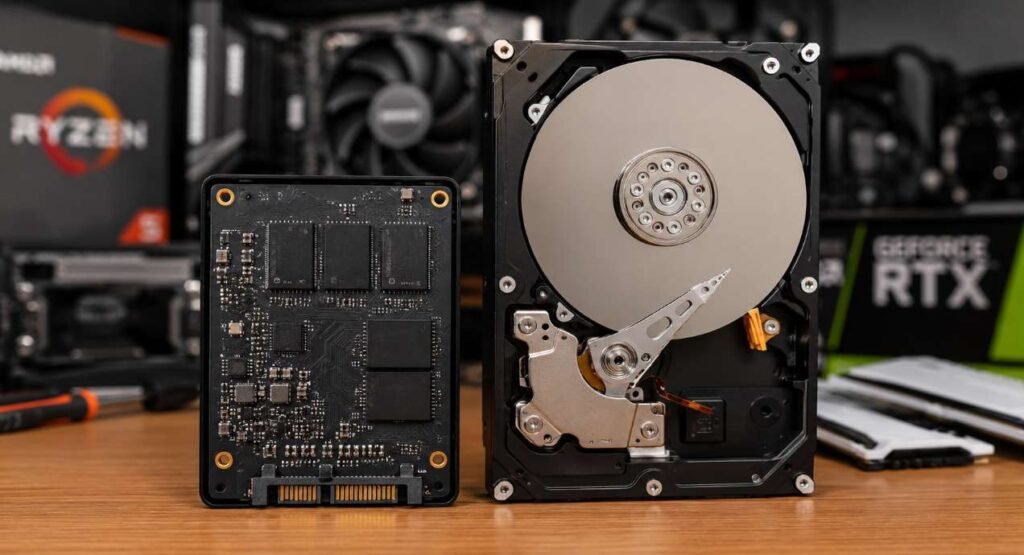
SSD vs HDD: The Real Difference (Not Just Marketing Talk)
Both SSDs (Solid State Drives) and HDDs (Hard Disk Drives) do the same job — they store your OS, games, and files permanently. How they do it is where everything else diverges. best CPU buying guide under 30k.
How an HDD Works
An HDD stores data on a spinning magnetic platter, read by a mechanical arm that physically moves across the disk. This mechanical movement is why HDDs are slower, noisier, and more fragile — there are moving parts that can fail from drops, vibration, or just age.
How an SSD Works
An SSD has no moving parts. Data is stored on flash memory chips, accessed almost instantly by an electronic controller. That’s the entire reason SSDs are faster, silent, and more shock-resistant — there’s nothing physically spinning or moving.
This one architectural difference is what drives every practical difference below: speed, noise, heat, durability, and increasingly, whether a modern game will even run smoothly.
Speed and Real-World Performance: The Gap Is Bigger Than You Think
Numbers on a spec sheet don’t mean much until you feel them. Here’s what the difference actually looks like day to day:
| Task | HDD (7200 RPM) | SATA SSD | NVMe SSD (Gen4) |
|---|---|---|---|
| Windows boot time | 35–50 seconds | 10–15 seconds | 6–10 seconds |
| Sequential read/write speed | 150–200 MB/s | 500–550 MB/s | 5,000–7,000 MB/s |
| Game level load time (open-world title) | 40–60 seconds | 12–18 seconds | 5–8 seconds |
| Random file access (small files) | Slow, noticeable lag | Fast | Near-instant |
| Noise | Audible clicking/whirring | Silent | Silent |
The sequential speed difference is what everyone quotes, but the random access difference is what you actually feel. HDDs are painfully slow at fetching thousands of small files scattered across the disk — which is exactly what happens every time Windows boots or a game loads textures. SSDs don’t have that bottleneck at all.
Types of SSDs You Need to Know in 2026
Not all SSDs are equal, and this trips up a lot of first-time buyers in India who assume “SSD” is one product category.
| SSD Type | Interface | Typical Speed | Best For |
|---|---|---|---|
| SATA SSD | SATA III | ~550 MB/s | Budget builds, OS + a few games |
| NVMe SSD (PCIe Gen3) | PCIe 3.0 | ~3,500 MB/s | Mainstream gaming builds |
| NVMe SSD (PCIe Gen4) | PCIe 4.0 | ~7,000 MB/s | High-end gaming, content creation |
| NVMe SSD (PCIe Gen5) | PCIe 5.0 | 10,000+ MB/s | Enthusiast/workstation builds (overkill for most gamers right now) |
If your motherboard has an M.2 slot (most boards from the last 3–4 years do), an NVMe SSD is almost always worth the small price premium over SATA — especially now that Gen3 and Gen4 NVMe prices have come close enough to SATA that skipping them barely saves money.
Price Per GB in 2026: Is SSD Still the Expensive Option?
This is the part that’s changed the most. A few years ago, HDD was the clear budget winner per GB. That gap has narrowed a lot — and for smaller capacities, it’s almost closed.
| Drive Type | Capacity | Indicative Price Range (INR) |
|---|---|---|
| HDD (7200 RPM) | 1TB | ₹4,999 – ₹9,999+ |
| HDD (7200 RPM) | 2TB | ₹8,999 – ₹14,999+ |
| HDD (7200 RPM) | 4TB | ₹20,500 – ₹26,000+ |
| SATA SSD | 500GB | ₹6,000 – ₹10,000+ |
| SATA SSD | 1TB | ₹13,500 – ₹18,500 |
| NVMe SSD (Gen3) | 1TB | ₹ ––- |
| NVMe SSD (Gen4) | 1TB | ₹15,000 – ₹22,000 |
⚠️ Verify before publishing: These are indicative ranges. current prices from Amazon India / Flipkart for the exact models you’re linking before this goes live.
Reliability and Lifespan: Which One Actually Lasts Longer?
This one surprises people — SSDs aren’t automatically less durable just because they’re newer tech.
- HDDs fail mechanically. Drops, vibration, and the sheer wear of a spinning platter over years are the main failure causes. Rated in MTBF (Mean Time Between Failures), typically 1–2 million hours — but real-world failure often comes from physical shock, which is a real risk with careless shipping or a cabinet with poor airflow and vibration.
- SSDs fail electrically, rated in TBW (Total Bytes Written) — essentially, how much data you can write before the flash memory wears out. A typical 1TB budget SSD is rated for 300–600TBW, which for a normal user (OS, games, documents) translates to well over a decade of realistic use.
For day-to-day reliability in a home PC, SSDs generally come out ahead simply because there’s no moving part to fail from a bump or a power cut mid-write. HDDs remain the safer bet for very long-term cold storage (backups you write once and rarely touch), since flash memory can lose charge if left completely unpowered for years — though this isn’t a practical concern for a drive you use regularly.
Gaming and Storage in 2026: Why GTA 6 Changes the Calculation
Here’s the part most SSD vs HDD articles don’t talk about, and it’s the reason this decision matters more right now than it did two years ago.
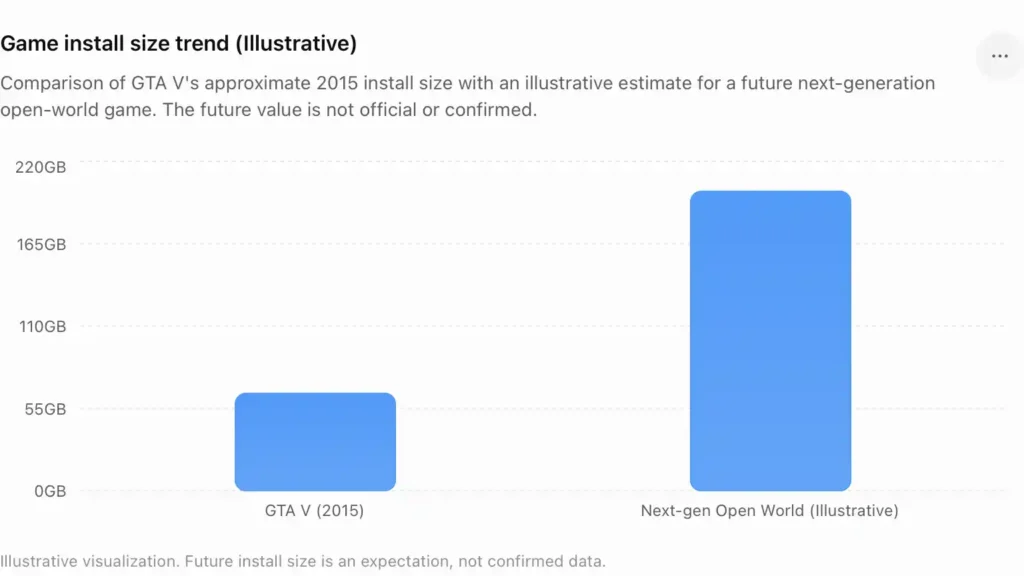
GTA 6 hasn’t launched yet — but everything Rockstar has shown points to a game built around the assumption that players have fast storage. GTA V’s PC install ballooned past 100GB once you count the required Rockstar Games Launcher and Social Club components, and that was a game designed around HDD-era hardware assumptions. GTA 6’s world is expected to be significantly larger and more graphically dense, and the current generation of consoles (PS5, Xbox Series X/S) was built around NVMe SSDs as a baseline requirement — not an optional upgrade. Several major titles this generation already require SSD-class read speeds just to avoid texture pop-in and stuttering.
Rockstar hasn’t published official PC system requirements yet, and going by their usual pattern with GTA V and RDR2, the PC version will likely arrive some time after the console release — so there’s no confirmed spec to quote here. But the direction is clear enough that it doesn’t need a spec sheet to plan around: if a game is designed for consoles that stream assets off an SSD by default, running it on a PC with a mechanical HDD is very likely to mean longer load screens, texture pop-in, and stutter — regardless of how strong your GPU is.
The practical move isn’t to panic-buy the fastest NVMe drive available. It’s to make sure your primary drive — the one running Windows and your games — is an SSD well before GTA 6’s PC version becomes a live question, so you’re not scrambling to reinstall your entire OS on launch week.
SSD vs HDD — Pros and Cons at a Glance
- Dramatically faster boot and load times
- Silent, no moving parts
- Shock and vibration resistant
- Lower power draw, less heat
- Higher price per GB at large capacities
- Limited write endurance (rarely an issue for normal use)
- Much cheaper per GB at 2TB+
- Reliable for long-term bulk/cold storage
- No write-cycle wear limit to worry about
- Noticeably slower boot/load times
- Audible noise and vibration
- Vulnerable to physical shock/drops
So, Which One Should You Choose in 2026?
The honest answer: most builds should use both, in specific roles — not pick one over the other.
| Your Situation | Recommended Setup |
|---|---|
| Pure budget build, no upgrade path planned | 500GB–1TB SATA SSD only |
| Budget gaming build (₹50,000–₹70,000) | 500GB NVMe SSD (OS + 2–3 games) |
| Mid-range gaming build | 1TB NVMe SSD (OS + games) + optional 1TB HDD for media/downloads |
| Content creation / video editing | 1TB NVMe SSD (OS + active projects) + 2TB+ HDD (archive/raw footage) |
| Home server / NAS / bulk archiving | HDD-first, 4TB+, redundancy (RAID/backup) matters more than speed |
If you can only afford one drive right now, make it an SSD — even a budget SATA SSD outperforms an HDD enough in daily use that it’s rarely worth going back. Add the HDD later, once budget allows, purely for bulk storage.
Best SSD and HDD Picks for Indian Buyers
Best Budget SATA SSD
Crucial BX500 500GB — solid, well-reviewed entry point for anyone upgrading from HDD-only.
Check Price on Amazon India →Best NVMe SSD for Gaming
WD Black SN7100 1TB / Samsung 980 1TB — Gen4 speeds at a price that’s crept close enough to Gen3 that there’s little reason to buy the older standard now.
Check Price on Amazon India →Best HDD for Bulk Storage
Seagate Barracuda 2TB / WD Blue 2TB — the standard reliable pick for a secondary bulk-storage drive.
Check Price on Amazon India →

